Walkthrough
QuickRoom vs WhatsApp, Discord, and Slack when the chat should end
I did not build QuickRoom to replace the apps your group already lives in. I built it because those apps are slow when the job is one deadline. The table below is the decision I use when someone asks “why not just WhatsApp?”
Sponsored offer — optional, not required to create or join a room.
Use the tool that matches the lifespan
If the same ten people will still need this thread next year, stay in WhatsApp, Discord, or Slack. Switching tools has a cost.
If you can point at a calendar and say “this is over on Friday,” a room with an expiry is usually less mess than a new group, server, or workspace.
| QuickRoom | Discord | Slack | ||
|---|---|---|---|---|
| Signup / phone number | None (nickname + room code) | Phone number | Account | Workspace account |
| Where it runs | Browser | App | App or browser | App or browser |
| Typical leftover | Room expires on a timer you set | Group stays on the phone | Server stays until someone deletes it | Channel/workspace stays |
| Best when | One assignment, shift, interview, trip, or handoff | People you already text | A community you will keep | A company that already lives in Slack |
| Poor fit | Under-18 / K–12; stranger video chat | Mixed-phone groups who should not swap numbers | A 90-minute panel | External guests for one hour |
| Official records | Not an ATS, LMS, or contract store | Not a records system | Not HR/legal storage | Can be, if IT says so |
WhatsApp and iMessage leftovers
WhatsApp is the default across much of the UK, EU, and Australia because everyone already has it. The hidden cost is a phone-number graph plus a group that sits on the home screen until someone is rude enough to leave.
In mixed iPhone/Android US groups, iMessage falls back to SMS and GroupMe becomes the campus default. A room code avoids collecting numbers from people you only need for this module.
Discord servers that never get archived
Discord is the right call for a society or a hackathon that already runs there. Creating a fresh server for five people still means accounts, roles, and a space that rarely gets deleted after the demo.
Use QuickRoom when some of the group does not have Discord yet, or when there should be no server owner after the weekend.
Slack is for organisations that already paid that tax
Guest accounts, SSO, and IT review make Slack a poor fit for a two-hour interview panel with an external chair. Keep the official file in the ATS. Use a browser room only for “we’re running long” and “you ask the next question.”
If your company already requires Slack for that panel, do not fight it. QuickRoom is for the case where Slack access is the blocker.
What the QuickRoom UI actually asks
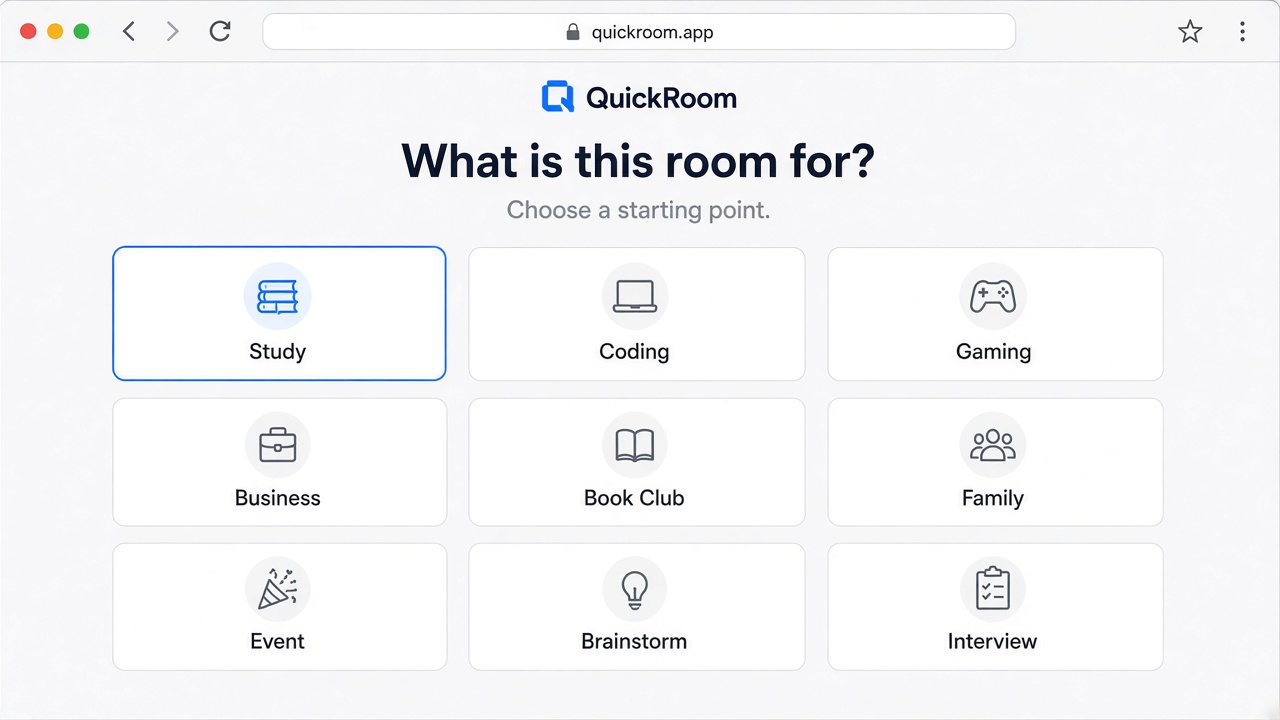
Template, name, expiry, nickname, private vs public. Then a share surface. Then chat. That is the whole create path. Compare that to “create workspace / verify email / invite guests / set channels.”
If you also want the connection private, use a VPN
Discord, WhatsApp, and Slack still see a lot of metadata even on “private” servers. QuickRoom still sits behind Cloudflare. A VPN is the missing layer: it encrypts the café Wi‑Fi hop. We reviewed three options the same way we built this product — can you pay without a phone number, is there an independent no-logs audit, will a US/UK/CA relative actually install it.
A private QuickRoom hides the leftover group, not the path from your café Wi‑Fi to Cloudflare. A VPN encrypts that path. We checked no-logs claims, independent audits, and whether you can pay without handing over a phone number — the same test we use for our own signup. These are not magic cloaks: we still see that a browser joined a room. They are the rare upsell that matches the product.
- Mullvad VPN — Best brand fit. Account is a number, not an email. Cash in the post is still an option. Independently audited no-logs, WireGuard by default. Slightly spartan app; that is the point.
- Proton VPN — Best “I have family in the UK and US and they will actually install it” pick. Swiss company, published audits, a real free tier (slow, limited). Paid Secure Core is the grown-up mode. Requires an account.
- IVPN — Quiet, audited, no-logs, and happy to take privacy-respecting payment. Fewer servers than the TV-ad brands; fewer reasons to harvest you. Good on US, UK, and Canadian exits.
Skip the random “free VPN” in an ads list. Those often sell your traffic. Discord and WhatsApp still see a lot after the VPN; QuickRoom still expires the room. Use both jobs: VPN for the pipe, room code for the guest list.
How to start
- Open QuickRoom and choose Create Room for a QuickRoom temporary chat.
- Pick a clear room name and an expiry that matches the real end of the work: an hour, a day, a week, or up to three months.
- Share the room code (or link/QR) with the people who need to join.
- Talk in the browser, share images if useful, then let the room expire when the moment is over.
Privacy and access
Temporary chat on QuickRoom is designed for short-lived coordination. Participants join with a room code and a nickname—no email address, phone number, or app install is required.
Treat the room code like an invitation. Share it only with the people who should be in the conversation, especially for Private or Invite Only rooms.
When the expiry you chose is reached, the room and its messages and images are cleaned up according to QuickRoom’s temporary-room lifecycle. That keeps the conversation from becoming another permanent group you never meant to keep.
Frequently asked questions
Is a QuickRoom temporary chat free to use?
Yes. Creating and joining a QuickRoom does not require a paid plan or an account for the core temporary chat experience.
Do people need to install an app?
No. Everyone joins from a modern browser with the room code and a nickname.
Do participants need phone numbers or email addresses?
No. QuickRoom uses anonymous browser identities for temporary rooms instead of permanent profiles.
How long does a room last?
You choose the expiry when you create the room. Common options include one hour, six hours, one day, one week, or three months.
Is a room code public?
Anyone who has the code can attempt to join. Share codes directly with the intended group and avoid posting them on public pages when the conversation should stay private.